Short answer: Squarespace if you want it to look beautiful tomorrow, WordPress if you want full control of every line, and neither if your business depends on Google traffic. Here's the Squarespace vs WordPress comparison the affiliate sites don't write.
What each one is, briefly
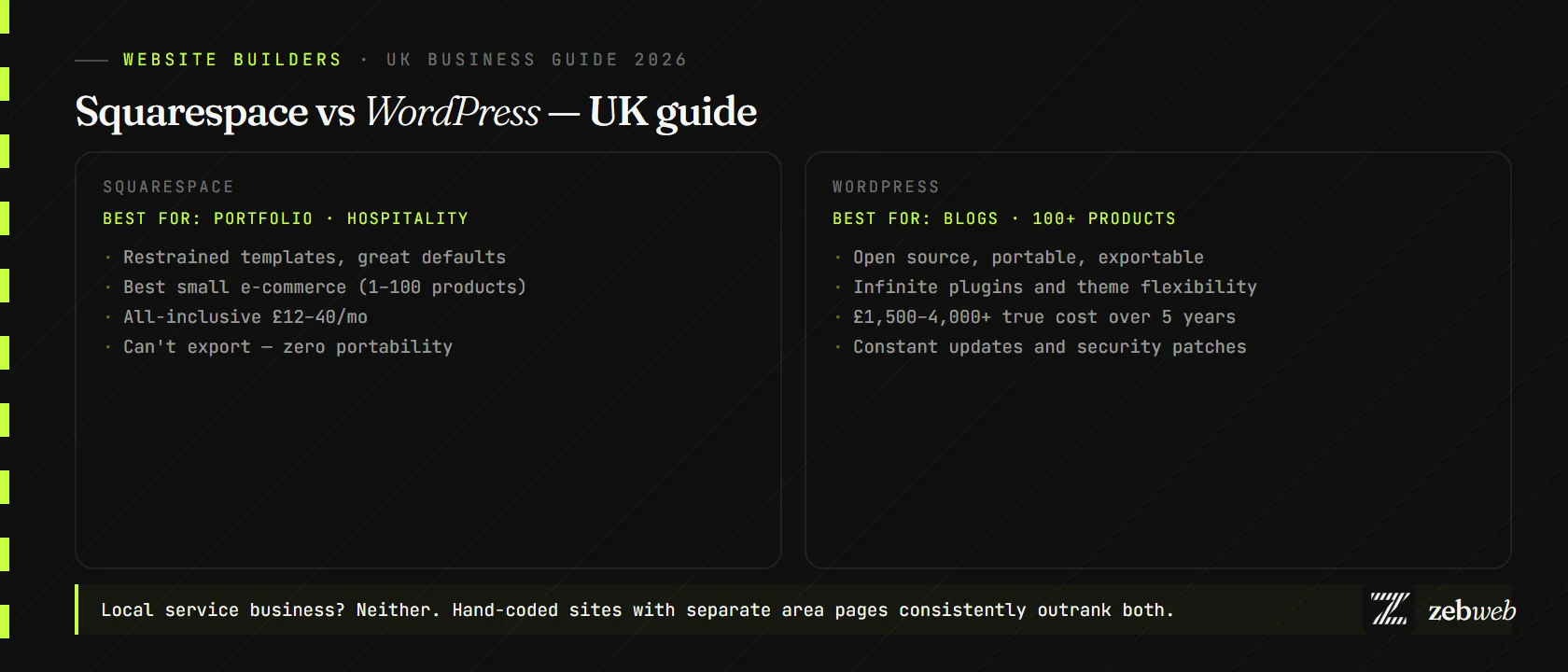
Squarespace is a closed platform — you build, host, and edit inside their tools. WordPress is open-source software you install on a host of your choice. You own the install but you're also responsible for keeping it alive.
Design and templates
Squarespace wins on defaults. Templates are restrained, type is set well, photos display generously. A complete amateur produces a tidy site. The downside: less flexibility once you want something a template doesn't anticipate.
WordPress can do anything, given the right theme and enough time. The cost is decision fatigue — you'll spend a week comparing themes, picking a page builder (Elementor, Divi, Bricks), and watching YouTube tutorials. Worth it if you want the end result; brutal if you don't.
Page speed and Core Web Vitals
Squarespace is slightly faster than WordPress out of the box, mostly because they control the stack. Most WordPress sites are slow because owners install too many plugins and pick heavy themes. A well-built WordPress site can be quick — most aren't.
Neither matches a hand-coded site. If you're competing in a search where speed matters (local services, e-commerce, anything where customers Google you on mobile), expect to lose to a competitor on a hand-coded build.
SEO
Roughly tied. WordPress has more granular SEO control via plugins (Yoast, RankMath); Squarespace has cleaner defaults that "just work" for basic on-page SEO. Both are fine for low-competition searches. Both struggle once you're up against well-built competitors.
Schema markup is easier on WordPress with plugins; Squarespace has improved its built-in schema in 2026 but still lags.
E-commerce
Squarespace handles a small product range (1–100 SKUs) beautifully — clean checkout, decent inventory tools, no extra plugins. WordPress with WooCommerce scales further and gives you more control, but it's an order of magnitude more setup and maintenance. For a 30-product Lincoln boutique, Squarespace wins on simplicity; for a 300-product clothing brand, WooCommerce or Shopify wins on flexibility.
True cost over five years
Squarespace: £12–£40/month × 60 = £720–£2,400. All-inclusive: hosting, SSL, backups, support.
WordPress: Hosting £10–£40/month, theme £50–£100, page builder £80/year, premium plugins £200–£400/year, plus the cost of someone keeping it updated. Over five years, £1,500–£4,000+ self-managed, or £3,000–£8,000 if you pay an agency a maintenance retainer.
Squarespace vs WordPress — when to pick each
- Portfolio, hospitality, restaurant, photographer? Squarespace. Templates were built for you.
- Blog-heavy site (50+ posts)? WordPress. Better content tools.
- Selling 100+ products? WordPress + WooCommerce, or Shopify.
- Local service business? Neither — hand-coded with separate service/area pages.
- Want to own the site outright? WordPress wins on portability (you can export). Squarespace gives you nothing if you leave.
- No time for maintenance? Squarespace. WordPress needs constant attention.
The honest third option
For most UK small businesses, a hand-coded site from £500 beats both Squarespace and WordPress for the first three years, by which point you've recouped the build cost in saved subscriptions and rank higher on Google. No theme to update, no plugin to break, no annual platform-fee hike.
The Wix vs Squarespace comparison covers the closed-platform side in more detail, or build a quote if you want to see what a hand-coded equivalent would cost.